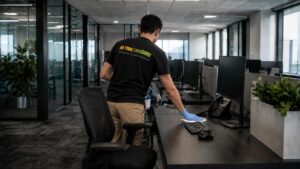
Office technology cleaning isn’t just about keeping devices tidy. It’s about protecting hygiene, performance and safety so your workplace runs smoothly every day.
Key Takeaways
- Office technology cleaning protects productivity and performance. Clean equipment runs more efficiently, reducing slowdowns, faults and unnecessary downtime.
- Regular cleaning reduces germs and supports employee wellbeing. Shared devices collect bacteria quickly, making consistent cleaning essential in busy workplaces.
- Cleaning extends the lifespan of office equipment. Removing dust and grime helps prevent overheating, damage and early replacement costs.
- Professional office technology cleaning saves time and money. Trained cleaners use safe methods that prevent damage and keep workplaces running smoothly.
Office technology cleaning is a critical but often overlooked part of workplace maintenance, directly affecting productivity, hygiene and day-to-day performance. As shared devices like computers, phones, keyboards and touchscreens are used constantly, they quickly accumulate dust, bacteria and grime. Without regular office technology cleaning, workplaces risk reduced efficiency, poorer hygiene standards and small equipment issues developing into costly problems.
Why Office Technology Gets Dirty Faster Than You Think
Office technology is handled far more frequently than most other surfaces in the workplace. Shared keyboards, desk phones and touchscreens are touched repeatedly throughout the day, often without any cleaning in between.
Air conditioning systems circulate fine dust particles through the workspace, which settle inside computers and on electronic surfaces. Eating lunch at desks leaves crumbs and residue behind. Shared devices pass from one set of hands to another, carrying germs with them. Even offices that appear tidy on the surface can suffer from poor office technology cleaning behind the scenes, allowing grime to build up unnoticed.
How Poor Office Technology Cleaning Affects Productivity
Poor office technology cleaning is not just an appearance issue. It directly affects how equipment functions and how efficiently employees can work.
Dust build-up inside computers restricts airflow, causing systems to overheat and slow down. Sticky keys, unresponsive mice and grimy touchscreens interrupt workflows and frustrate staff. Printers that are not cleaned regularly are more prone to jams and mechanical faults.
While each issue may seem minor on its own, the combined effect across a team leads to lost time, reduced efficiency and unnecessary stress. Consistent office technology cleaning helps equipment perform as intended, allowing employees to focus on their work rather than dealing with avoidable technical problems.
Office Technology Cleaning Helps Extend Equipment Lifespan
Regular office technology cleaning plays an important role in extending the lifespan of workplace equipment. Dust build-up inside computers and other electronics blocks vents and cooling fans, leading to overheating and increased wear on internal components.
Over time, this strain shortens the life of office technology and increases the likelihood of failure. By maintaining a consistent office technology cleaning routine, businesses reduce the risk of premature breakdowns and delay expensive repairs or replacements. Cleaning also makes it easier to identify early signs of wear or damage before they turn into major faults.

Reducing Germs Through Better Office Technology Cleaning
Office technology is one of the biggest germ carriers in the workplace. A typical office phone alone can contain hundreds of thousands of germs per square inch. Keyboards, mice and shared screens are touched repeatedly throughout the day, making them ideal surfaces for bacteria and viruses to spread.
Regular office technology cleaning supports employee well-being and helps reduce the spread of illness. This is one of the reasons having a clean space matters for health, focus and peace of mind in any working environment:
When staff feel confident that shared equipment is cleaned properly, they are more comfortable using it and less likely to take preventable sick leave.
Office Technology Cleaning and Workplace Safety
Office technology cleaning also plays an important role in workplace safety. During routine cleaning, potential hazards such as frayed cables, loose connections or damaged plugs are more likely to be noticed.
Spotting Issues Early Through Cleaning
Addressing these issues early helps prevent equipment failure and reduces the risk of electrical hazards. In busy offices, safety concerns linked to technology can go unnoticed until something goes wrong. Regular office technology cleaning acts as both a hygiene measure and a practical safety check.
How Often Should Office Technology Cleaning Be Done?
Knowing how often to carry out office technology cleaning makes the task far more manageable and consistent.
Recommended Office Technology Cleaning Frequency
Daily cleaning should focus on shared keyboards, phones, mice and touchscreens. Weekly cleaning is suitable for monitors, printers and individual workstations. Monthly cleaning should include cables, vents, and areas behind desks and equipment.
This structured approach to office technology cleaning keeps equipment hygienic and functional without disrupting daily operations.

What Not to Use During Office Technology Cleaning
Office electronics are sensitive and can be easily damaged if cleaned incorrectly. Poor office technology cleaning practices often cause more harm than good.
Using too much moisture, harsh cleaning products or improper techniques can damage screens, ports and internal components. Educational guidance on cleaning and disinfecting electronic devices safely highlights the importance of minimal liquid, avoiding abrasive chemicals, and following device-appropriate cleaning methods.
Spills and Office Technology Cleaning: What to Do Immediately
Accidents happen in busy workplaces, and spills are one of the most common causes of office technology damage.
If a spill occurs, the device should be powered down immediately, unplugged from the power source and gently dried on the exterior. Equipment should not be dismantled by untrained staff. In many cases, professional office technology cleaning is required to prevent long-term damage. Acting quickly often determines whether equipment can be saved or needs replacing.
Why Professional Office Technology Cleaning Saves Time and Money
While some basic cleaning tasks can be handled in-house, office technology cleaning is not always simple. Many devices require careful handling, specialist tools or partial disassembly to be cleaned safely and effectively.
Most staff are not trained to manage this level of cleaning and should not be expected to take on tasks that could damage expensive equipment. For this reason, many businesses view hiring a commercial cleaning service as a practical, long-term investment.
Professional cleaners bring experience, consistency and accountability to office technology cleaning. They help reduce downtime, avoid costly mistakes and ensure equipment is cleaned thoroughly without compromising performance or safety.
Final Thoughts
Office technology plays a central role in productivity, communication and daily operations, yet it is easy to overlook how much wear and tear it experiences. From improving performance and extending equipment lifespan to supporting employee wellbeing and workplace safety, consistent office technology cleaning delivers real, measurable benefits.
If you want your workplace to remain safe, efficient and well-maintained, professional support makes a meaningful difference. Our office cleaning services are designed to support effective office technology cleaning while keeping workspaces clean, hygienic and fully functional:
A cleaner office is not just about appearances. It is about creating an environment where people and systems can perform at their best.